• Don't want to see ads? Install an adblocker like uBlock Origin or use a Europe-based privacy-friendly browser like Vivaldi or Mullvad.

Comparing Ancient Greek populations to modern Greeks and Italians

There's a study that demonstrates AI can reduce the learning curve of new hires by 6 months. I'm hoping that will also aid me in this endeavor.
Chatgpt: qpAdm is a tool used in population genetics to model a target population as a mixture of two or more source populations. It's often used to model modern populations using ancient DNA. Here's a general step-by-step guide on how to run qpAdm:
1. **Prepare the Input Files**: The first step is to prepare the input files. You will need a parameter file, a genotype file, and a SNP file. The parameter file specifies the details of the analysis, the genotype file contains the genetic data, and the SNP file contains information about the SNPs.
2. **Specify the Populations**: In the parameter file, specify the target population and the source populations. The target population is the one you are trying to model, and the source populations are the ones you are using to model the target.
3. **Choose the Outgroup**: Choose an outgroup population. This should be a population that is not closely related to any of the source or target populations.
4. **Run qpAdm**: Once you have prepared the input files and specified the populations, you can run qpAdm. The command to run qpAdm is typically something like this: `qpAdm -p parameterfile.par`.
5. **Interpret the Results**: qpAdm will output a number of statistics, including the proportion of each source population in the target population and a p-value for the model. If the p-value is high, this suggests that the model is a good fit for the data.
Remember that the specifics of how to run qpAdm can vary depending on the details of your analysis and the format of your data. Always refer to the qpAdm documentation and any relevant literature to ensure you are using the tool correctly.
If you need a visual guide or a more detailed explanation, I can create a diagram or search for scientific literature that explains the process in more detail.

Elaborate on step 1:

Sure, let's break down the first step of preparing the input files for qpAdm:

1. **Parameter File**: This is a text file that specifies the details of the analysis. It includes the names of the target and source populations, the name of the outgroup, and the names of the genotype and SNP files. Here's an example of what a parameter file might look like:

```
genotypename: geno.txt
snpname: snp.txt
indivname: ind.txt
popfilename: popfile.txt
```

In this example, `geno.txt` is the genotype file, `snp.txt` is the SNP file, `ind.txt` is the individuals file, and `popfile.txt` is the population file.

2. **Genotype File**: This file contains the genetic data for the individuals in your study. Each row corresponds to a SNP, and each column corresponds to an individual. The entries in the file are the genotypes of the individuals at the SNPs.

3. **SNP File**: This file contains information about the SNPs in your study. Each row corresponds to a SNP. The columns typically include the SNP ID, the chromosome number, the genetic position, the physical position, and the alleles.

4. **Individuals File**: This file contains information about the individuals in your study. Each row corresponds to an individual. The columns typically include the individual ID, the sex, and the population.

5. **Population File**: This file specifies the target and source populations for the analysis. Each row corresponds to a population. The columns typically include the population name and whether it is a target or source population.

Remember that the exact format of these files can vary depending on the specifics of your analysis and the version of qpAdm you are using. Always refer to the qpAdm documentation to ensure you are preparing the input files correctly.
 
Elaborate on step 1:
Sure, let's break down the first step of preparing the input files for qpAdm:
1. **Parameter File**: This is a text file that specifies the details of the analysis. It includes the names of the target and source populations, the name of the outgroup, and the names of the genotype and SNP files. Here's an example of what a parameter file might look like:
```
genotypename: geno.txt
snpname: snp.txt
indivname: ind.txt
popfilename: popfile.txt
```
In this example, `geno.txt` is the genotype file, `snp.txt` is the SNP file, `ind.txt` is the individuals file, and `popfile.txt` is the population file.
2. **Genotype File**: This file contains the genetic data for the individuals in your study. Each row corresponds to a SNP, and each column corresponds to an individual. The entries in the file are the genotypes of the individuals at the SNPs.
3. **SNP File**: This file contains information about the SNPs in your study. Each row corresponds to a SNP. The columns typically include the SNP ID, the chromosome number, the genetic position, the physical position, and the alleles.
4. **Individuals File**: This file contains information about the individuals in your study. Each row corresponds to an individual. The columns typically include the individual ID, the sex, and the population.
5. **Population File**: This file specifies the target and source populations for the analysis. Each row corresponds to a population. The columns typically include the population name and whether it is a target or source population.
Remember that the exact format of these files can vary depending on the specifics of your analysis and the version of qpAdm you are using. Always refer to the qpAdm documentation to ensure you are preparing the input files correctly.

We might have a separate and specific thread with this informations, I think it would be useful for anyone willing to learn.
 
We might have a separate and specific thread with this informations, I think it would be useful for anyone willing to learn.
I was thinking that too.

I will put it together once I get back from my trip.
 
TBH, the Anatolian_N looks a bit low for South Italians

wjmrSkE.png


2qYeBc1.png


Also the similar qpAdm results are also consistent G25 distances too. South Italians are closer to Cypriots than Mycenaeans and Iron age Italians/Sicilians. South Italians and Cypriots have almost the same ANF levels and low WHG.

Basically Cypriots and South Italians have the like opposite Steppe vs Iran N proportions and similar ANF.

I looked at many pictures of Sardinians and South Italians. They look very similar despite the big difference in ANF levels. Could be selection, environment (Med), dominant phenotypes because of ANF being the highest in both and less North Euro admix which had selection for North Euro phenos. I dont know if the Napoli fans are actually South Italians but they seem a bit more Northern looking than Sardinians. This debunks the myth that South Italians look more Eastern than the ancient Greeks.
Below i picked almost every picture i could find and did not cherry pick, i made it because people seem to keep reposting the same cherry picked weird pictures of South Italians and Cypriots.

Cypriot fans
https://imgur.com/a/N0Oi2R5


Cypriots at a tavern
https://imgur.com/a/OkdLEPp


Sardinia, Cagliari fans
https://imgur.com/a/zZNDJeL


Napoli fans
https://imgur.com/a/Zu4Il1d
 
I dont know if the Napoli fans are actually South Italians but they seem a bit more Northern looking than Sardinians. This debunks the myth that South Italians look more Eastern than the ancient Greeks.

Napoli fans (unlike those of others club like Milan, Juventus and Inter, who can be from various part of Italy) are almost exclusively neapolitans from Naples or neapolitans who migrated in other parts of Italy. So yes, I would say that they are quite representative of their city.
 
I think they look more Western European, because South Italians, particularly Apulians are primarily northwest European and Aegean_EBA (minoan-like), which is how Raveane et al. 2022 modeled them.
Btw, the chart looks better imo, and more consistent with how papers model South Italians, regarding ANF. I believe the South Italian sample provided by the Reich lab is a Calabria sample from a medical study. But frankly, we have long discussed why this sample is even used considering it failed to pick up even slight affinity to Lazaridis et al. 2017 samples. Something is amiss with it. There's such a wealth of modern Italian DNA, idk why they continue to use it.
The palace of Nestor BA sample is actually not close to South Italians. The 3D PCA shows a large distance on the Z-axis.
I maintain that the Daunians are not true Southern Italian IA samples. They're late Bronze Age invaders from the northern Balkans.
Most modern Apulians have no idea who the Daunians are. But many of them know there's an affinity to Greeks.
I think Aneli et al. 2021 has a ton of problems. For some reason they use two samples from outside of Foggia to represent the middle ages. Yet the Viking DNA study has a more substantial middle ages sample set that actually resembles modern Apulians. Sometimes academics fly by the seat of their pants, unfortunately.
 
I think Aneli et al. 2021 has a ton of problems. For some reason they use two samples from outside of Foggia to represent the middle ages. Yet the Viking DNA study has a more substantial middle ages sample set that actually resembles modern Apulians. Sometimes academics fly by the seat of their pants, unfortunately.

Nevertheless that study also can model them with Minoan, but they don't use Lasithi.
 
wjmrSkE.png


2qYeBc1.png


Also the similar qpAdm results are also consistent G25 distances too. South Italians are closer to Cypriots than Mycenaeans and Iron age Italians/Sicilians. South Italians and Cypriots have almost the same ANF levels and low WHG.

Basically Cypriots and South Italians have the like opposite Steppe vs Iran N proportions and similar ANF.

I looked at many pictures of Sardinians and South Italians. They look very similar despite the big difference in ANF levels. Could be selection, environment (Med), dominant phenotypes because of ANF being the highest in both and less North Euro admix which had selection for North Euro phenos. I dont know if the Napoli fans are actually South Italians but they seem a bit more Northern looking than Sardinians. This debunks the myth that South Italians look more Eastern than the ancient Greeks.
Below i picked almost every picture i could find and did not cherry pick, i made it because people seem to keep reposting the same cherry picked weird pictures of South Italians and Cypriots.

Cypriot fans
https://imgur.com/a/N0Oi2R5


Cypriots at a tavern
https://imgur.com/a/OkdLEPp


Sardinia, Cagliari fans
https://imgur.com/a/zZNDJeL


Napoli fans
https://imgur.com/a/Zu4Il1d

Did you conveniently forget that they are vey close Deep Mani? You are also mixing ancient and modern populations. Also the difference between Cypriots and Mycenaeans is very small.
 
Did you conveniently forget that they are vey close Deep Mani? You are also mixing ancient and modern populations. Also the difference between Cypriots and Mycenaeans is very small.

But which people look more like Mycenaeans? Wouldn't it be the south Italians and Maniots? I now that i mixed modern with ancient, i did that on purpose.
 
The palace of Nestor BA sample is actually not close to South Italians. The 3D PCA shows a large distance on the Z-axis.
Which 3D PCA, the G25 one? Don't use the 3D G25 PCA, its misleading. Also to properly make a G25 2D PCA you need to adjust your window so the dimensions are not stretched.

Calabrians are actually closest to the Nestor BA samples than other Mycenaeans
 
Napoli fans (unlike those of others club like Milan, Juventus and Inter, who can be from various part of Italy) are almost exclusively neapolitans from Naples or neapolitans who migrated in other parts of Italy. So yes, I would say that they are quite representative of their city.

Nice, that's good then. Maybe next time i will only make sure the pictures are from home games, like i did for Sardinians.
 
Which 3D PCA, the G25 one? Don't use the 3D G25 PCA, its misleading. Also to properly make a G25 2D PCA you need to adjust your window so the dimensions are not stretched.
Calabrians are actually closest to the Nestor BA samples than other Mycenaeans
Actually, I am mistaken. It was Palace of Nestor EIA that I am referring to.
 
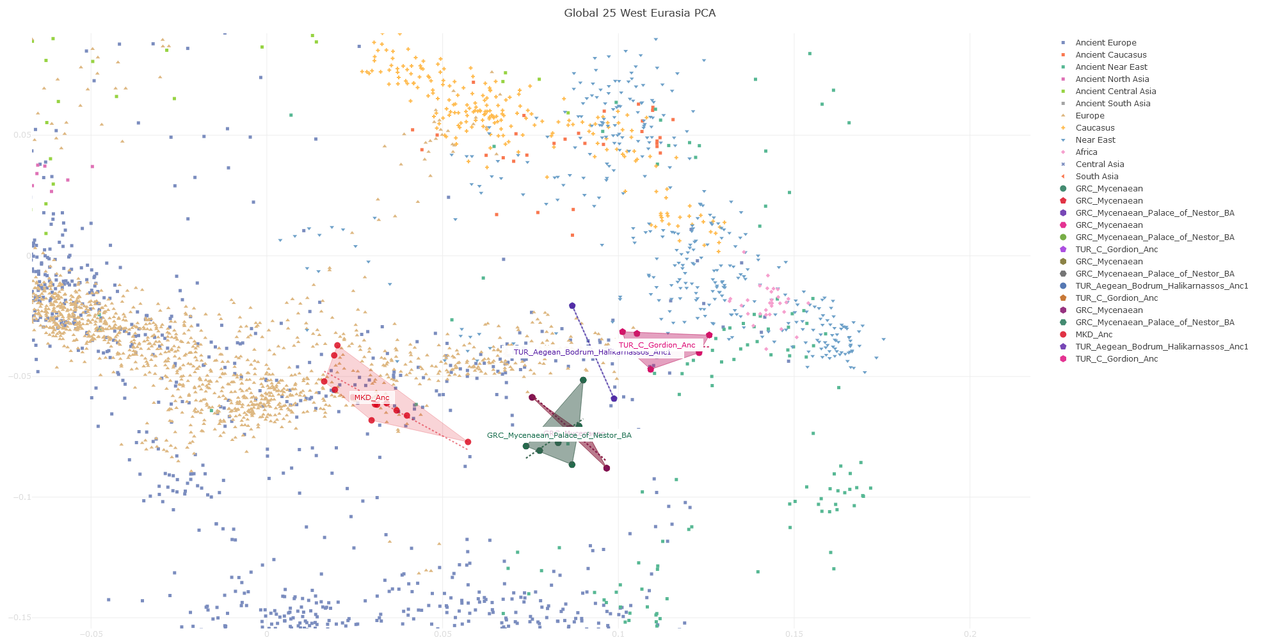
PCA comparing Calabrians, Deep Maniotes and Apulian Greeks with bronze age Myceneans and Iron age Ionian Greeks. I think these two clusters (bronze age myceneans and Iron age Ionian greeks) might be roughly representative of the archaic and classical aegean landscape.

Of course, it's just a G25 PCA, so take it for what it's worth.

 
You got any sites where i can get good regional Italian phenos with good quality?

Cypriot fans
https://imgur.com/a/N0Oi2R5

Cypriots at a tavern
https://imgur.com/a/OkdLEPp

Cypriot interviews
https://imgur.com/a/NxqRI3H

Cypriot people from social media:
https://imgur.com/a/55tgrYK

Greek Thessaly
https://imgur.com/a/sZTZLLZ

Sardinia, Cagliari fans
https://imgur.com/a/zZNDJeL

Napoli fans
https://imgur.com/a/Zu4Il1d

Iranians:
https://imgur.com/a/1VbvdZ4

Orthodox Christian Levantines
https://imgur.com/a/7yhQ2lS
 
Last edited:
That's correct, like I said it would be interesting to see a map using that as an admixture component. I don't think it would be unreasonable considering academic studies use "mixed" components as well.
"Steppe/Yamna" usually comes as a package "EHG+CHG" how could one decern excess non-steppe related CHG when only using EHG and CHG? But also even "Natufian" is mixed, as well as Anatolia Hunter-gatherers. Frankly, I'm not entirely convinced that is an appropriate method. Nevertheless, I can respect your insights considering you have knowledge with qpADM as a tool.
That being said, I still think my approach to the topic is indeed viable. I hope you can respect that.

Everything is mixed, there is no choice but to use mixed procxies, i just meant that Peloponnese_N is not an average of homogenous samples from one period but they span 2-5k years and differ in admixture (i forgot the exact year numbers), it seems that their Iran N just increased over time. It starts of Barcin_N like and ends up Minoan like.

So the Peloponnese_N samples must be separated according to the dates.
 
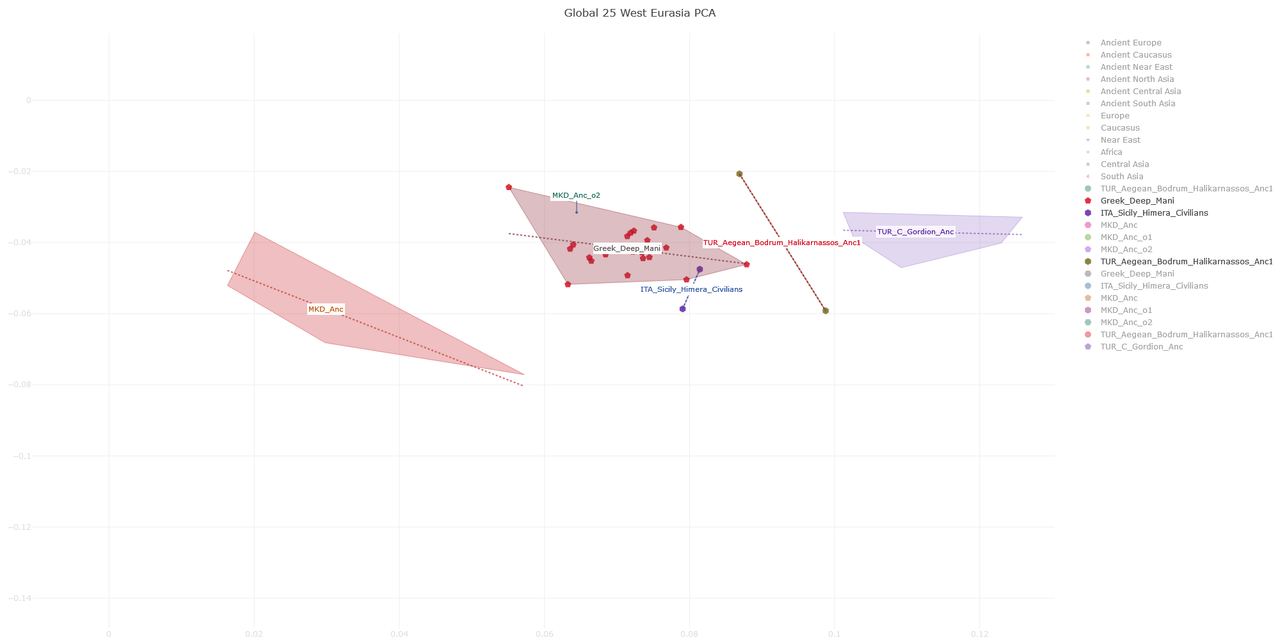
Maybe the Himera civilian+Halikarnassos cluster could be a decent approximation of the aegean Iron age landscape. I added also macedonian and Frigian samples to have an idea of contemporary populations in central Anatolia and north of the Aegean sea.

 
Maybe the Himera civilian+Halikarnassos cluster could be a decent approximation of the aegean Iron age landscape. I added also macedonian and Frigian samples to have an idea of contemporary populations in central Anatolia and north of the Aegean sea.


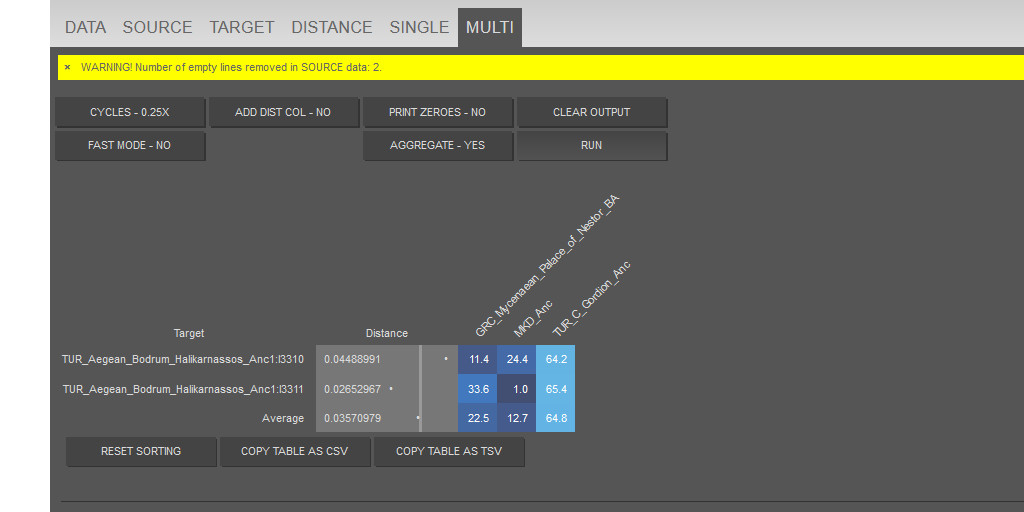
I think Halikarnassos is a recent mix. The Mugla Archaic samples are probably more representative of the iron age West Anatolians, unless they aren't coastal enough and less mixed than the coastal Aegeans. The Mugla Iron age West Anatolian samples seem to be almost the same as the Mycenaeans but with 7% less ANF and around as more Iran N

Code:
P 0.638
  target                          left                      weight     se     z
  <chr>                           <chr>                      <dbl>  <dbl> <dbl>
1 Aegean_Anatolia_Mugla_750_480bc Turkey_N                  0.622  0.0178 34.9 
2 Aegean_Anatolia_Mugla_750_480bc Israel_Natufian           0.0655 0.0155  4.22
3 Aegean_Anatolia_Mugla_750_480bc Iran_TepeAbdulHosein_N.SG 0.121  0.0178  6.78
4 Aegean_Anatolia_Mugla_750_480bc Georgia_Kotias.SG         0.0623 0.0199  3.13
5 Aegean_Anatolia_Mugla_750_480bc Russia_Samara_EBA_Yamnaya 0.130  0.0163  7.98


P 0.255
  target                     left                        weight     se     z
  <chr>                      <chr>                        <dbl>  <dbl> <dbl>
1 Greece_BA_Mycenaean_Attica Turkey_N                    0.670  0.0292 22.9 
2 Greece_BA_Mycenaean_Attica Israel_Natufian             0.0719 0.0273  2.64
3 Greece_BA_Mycenaean_Attica Iran_TepeAbdulHosein_N.SG   0.0935 0.0285  3.29
4 Greece_BA_Mycenaean_Attica Russia_Samara_EBA_Yamnaya   0.141  0.0433  3.26
5 Greece_BA_Mycenaean_Attica Serbia_IronGates_Mesolithic 0.0238 0.0202  1.18


right = c('Ethiopia_4500BP.DG', 'Russia_MA1_HG.SG', 'Morocco_Iberomaurusian', 'Turkey_Epipaleolithic', 'Turkey_Boncuklu_N', 'Iran_Wezmeh_N.SG', 'Georgia_Satsurblia.SG', 'Russia_Sidelkino_HG.SG', 'Switzerland_Bichon.SG')


left = c('Turkey_N', 'Israel_Natufian', 'Iran_TepeAbdulHosein_N.SG', 'Georgia_Kotias.SG', 'Russia_Samara_EBA_Yamnaya', 'Serbia_IronGates_Mesolithic')
P 0.0587
  target                          left                         weight     se      z
  <chr>                           <chr>                         <dbl>  <dbl>  <dbl>
1 Aegean_Anatolia_Mugla_750_480bc Turkey_N                    0.579   0.0253 22.9  
2 Aegean_Anatolia_Mugla_750_480bc Jordan_PPNB                 0.0953  0.0223  4.27 
3 Aegean_Anatolia_Mugla_750_480bc Iran_TepeAbdulHosein_N.SG   0.120   0.0181  6.60 
4 Aegean_Anatolia_Mugla_750_480bc Georgia_Kotias.SG           0.0588  0.0210  2.80 
5 Aegean_Anatolia_Mugla_750_480bc Russia_Samara_EBA_Yamnaya   0.141   0.0250  5.64 
6 Aegean_Anatolia_Mugla_750_480bc Serbia_IronGates_Mesolithic 0.00668 0.0102  0.652


P 0.163
  target                     left                        weight     se     z
  <chr>                      <chr>                        <dbl>  <dbl> <dbl>
1 Greece_BA_Mycenaean_Attica Turkey_N                    0.649  0.0421 15.4 
2 Greece_BA_Mycenaean_Attica Jordan_PPNB                 0.0814 0.0410  1.98
3 Greece_BA_Mycenaean_Attica Iran_TepeAbdulHosein_N.SG   0.0928 0.0286  3.25
4 Greece_BA_Mycenaean_Attica Russia_Samara_EBA_Yamnaya   0.149  0.0429  3.46
5 Greece_BA_Mycenaean_Attica Serbia_IronGates_Mesolithic 0.0278 0.0174  1.59

right = c('Ethiopia_4500BP.DG', 'Russia_MA1_HG.SG', 'Morocco_Iberomaurusian', 'Turkey_Epipaleolithic', 'Turkey_Boncuklu_N', 'Iran_Wezmeh_N.SG', 'Georgia_Satsurblia.SG', 'Russia_Sidelkino_HG.SG', 'Switzerland_Bichon.SG', 'Israel_Natufian', 'Lithuania_EMN_Narva')


left = c('Turkey_N', 'Jordan_PPNB', 'Iran_TepeAbdulHosein_N.SG', 'Georgia_Kotias.SG', 'Russia_Samara_EBA_Yamnaya', 'Serbia_IronGates_Mesolithic')
 
I see that those two samples from Halicarnassus are from the hellenistic age, but I assume that in the Iron age the inhabitants of the city might have been quite similar (maybe I'm wrong, though).

They seems to fall between bronze age Myceneans and Phrigians, although maybe the latter aren't the best proxies for Carian inhabitants of southwestern Anatolia.


Back
Top